

How our latest update solves your biggest reconciliation headaches
Yearly inventory is often the most stressful time of the year for operations teams. It’s not just about physically scanning barcodes; it’s about answering the hard questions that come after the scanning is done:
- “Where did that expensive desk go?”
- “Why do we have 3 extra laptops in the conference room?”
- “Who moved the projector without telling anyone?”
In the past, answering these questions meant hours of staring at Excel spreadsheets, manually comparing rows, and hoping you didn’t miss anything.
With our latest update, we are changing that. We’ve transformed the Portal from a simple data viewer into a Reconciliation Engine. Here is how the new features help you finish your inventory faster and with more confidence.
1. Stop Searching, Start Fixing: The New Discrepancy Report
The biggest pain in inventory isn’t counting—it’s reconciling. You have a list of what should be there (from your ERP), and a list of what you actually scanned. Finding the differences used to be a manual nightmare.
The Solution: Our new Discrepancy Report acts like an automated detective. It instantly analyzes your entire inventory and categorizes every single asset into clear, actionable buckets:
- ✅ MATCHED: The asset is exactly where it should be.
- ❌ MISSING: It was on your list, but your team didn’t find it.
- 📍 MOVED: We found it, but it’s in a different room than expected.
- 🆕 NEW: We found it, but it wasn’t on your original list.
- 🗑️ WRITE-OFF: It was scanned but marked as damaged or to be discarded.
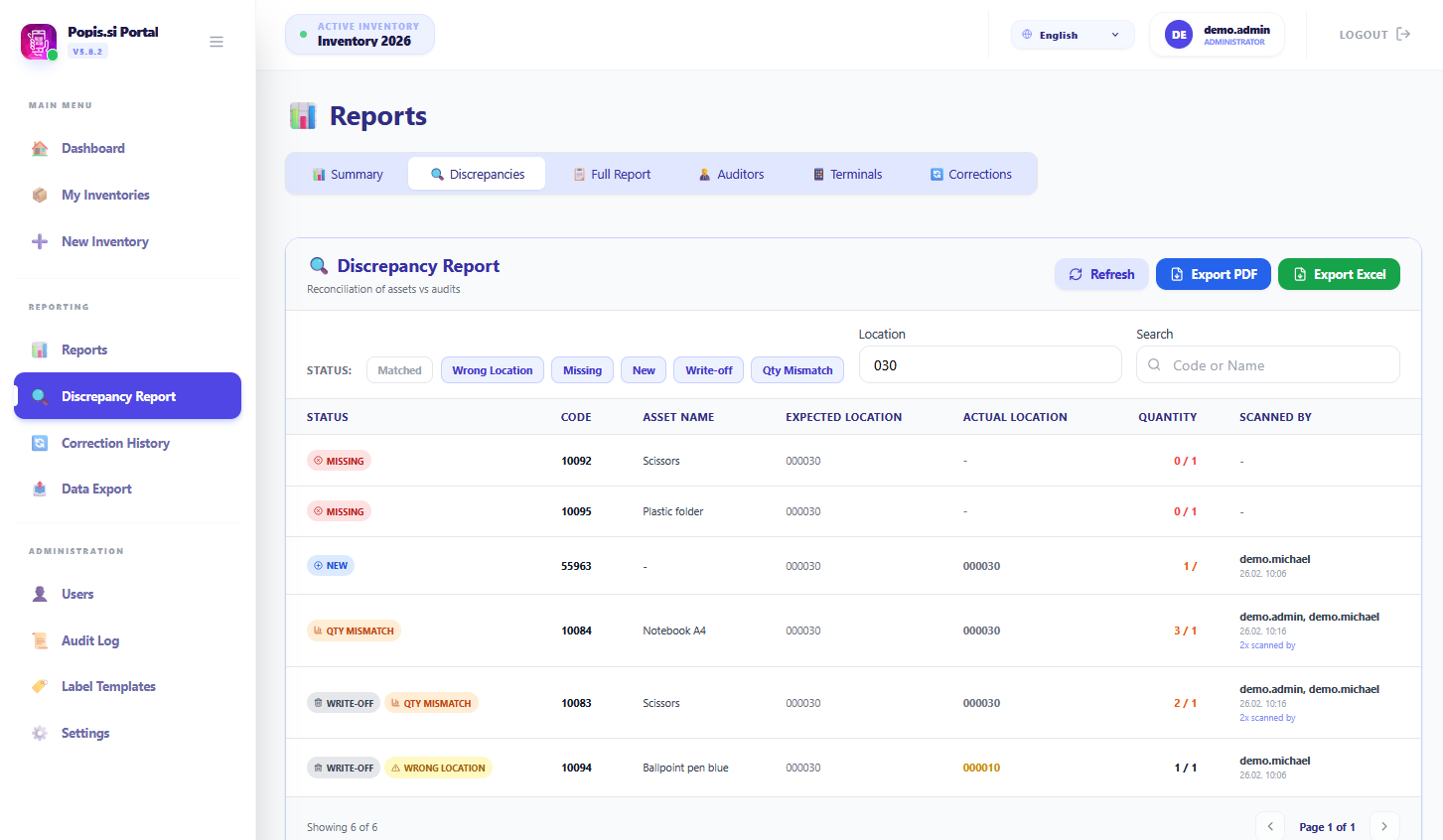
The Benefit: instead of spending days finding the errors, you see them instantly. You can print a PDF for your team that says, “Go to Room 101 and look for these 3 missing chairs,” or “Here is a list of everything that moved to the 3rd floor.”
2. A Safety Net for Your Data: Correction History & Undo
During an inventory, things change fast. Assets are renamed, locations are updated, and sometimes… mistakes happen. A common fear is, “What if I change something by accident and can’t remember the original value?”
The Solution: We’ve introduced a comprehensive Correction History. The system now tracks every single change made to an asset—whether it’s a location update, a name change, or a new person assigned.
- Total Transparency: See exactly who changed an asset and when.
- The “Oops” Button: Did someone accidentally rename “Main Server” to “Old Laptop”? No problem. Ideally, administrators can now use the Undo button to instantly revert a change and restore the original data.

3. Real-Time Pulse: The Dashboard
Waiting until the last day to see if you’re going to finish on time is a recipe for disaster. You need to know now if a specific department is falling behind.
The Solution: The enhanced Dashboard & Full Report gives you a “Control Tower” view of your operation:
- Visual Progress: Rooms turn from Red to Yellow to Green as they are completed. You can see at a glance which locations are 100% audited and which haven’t been touched.
- Team Performance: See how many assets each auditor has scanned and their average speed.
- Device Health: Our new “Heartbeat” chart shows you if a handheld terminal hasn’t synced in a while, so you can catch connectivity issues before data is lost.
Summary
Popis.si isn’t just about new buttons; it’s about peace of mind.
By automating the comparison process and giving you a safety net for data changes, we let you focus on what really matters: keeping your physical assets under control.
Ready to streamline your next inventory? Contact us to schedule a demo of the new reporting suite.

